
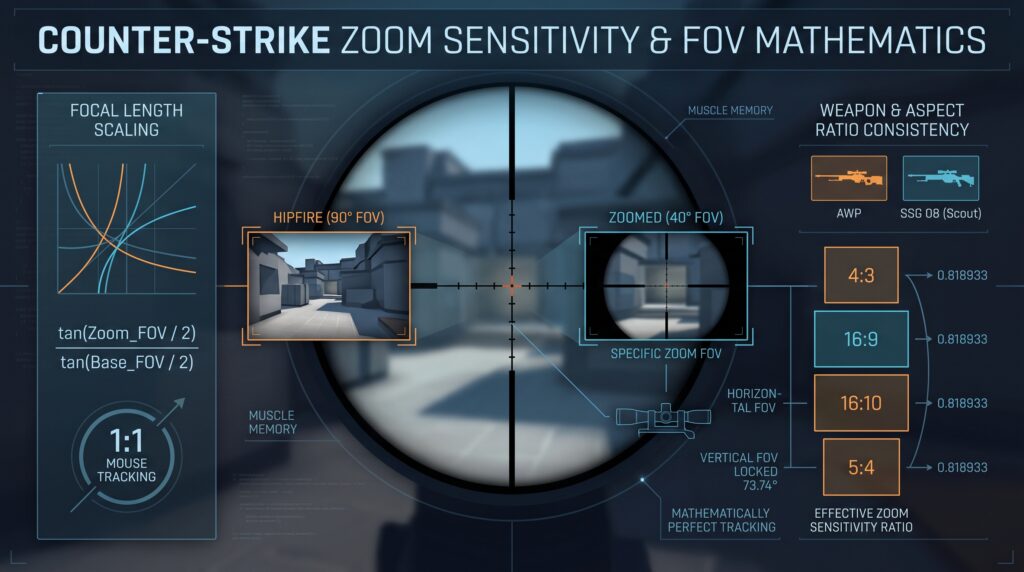
Understanding the exact relationship between Field of View (FOV) and zoom sensitivity is essential for maintaining consistent muscle memory across different zoom levels. To achieve 1:1 tracking—where a specific physical mouse movement covers the same visual screen distance regardless of zoom level—we must rely on focal length scaling rather than the game engine’s default linear scaling.
The Core Mathematical Principle
By default, the Counter-Strike engine scales zoomed sensitivity linearly. However, visual projection on a 2D monitor is trigonometric. To perfectly match the feel of your hipfire sensitivity during small flicks (tracking near the crosshair), the sensitivity ratio must be adjusted using the tangent of the half-angles of the FOV.
The formula for true focal length scaling is:
Focal_Ratio = tan(Zoom_FOV ÷ 2) / tan(Base_FOV ÷ 2)
Because the Source engine already applies a linear reduction based on FOV changes, we must calculate a compensatory multiplier—the zoom_sensitivity_ratio—to correct the engine’s math. The complete formula for the in-game setting (originally mathematically proven by the community) is:
Ratio_Setting = [ tan(Zoom_FOV × π/360) / tan(Base_FOV × π/360) ] × (Base_FOV / Zoom_FOV)
Weapon-Specific Calculations
The base FOV used by the engine for sensitivity calculations is always 90°, natively based on the 4:3 aspect ratio.
The AWP
- First Zoom (40° FOV):
[ tan(20°) / tan(45°) ] × (90 / 40) ≈ 0.36397 × 2.25 = 0.818933 - Second Zoom (10° FOV):
[ tan(5°) / tan(45°) ] × (90 / 10) ≈ 0.08748 × 9.0 = 0.787398
The SSG 08 (Scout)
- First Zoom (40° FOV):
The calculation is identical to the AWP’s first zoom. The ratio remains 0.818933. - Second Zoom (15° FOV):
[ tan(7.5°) / tan(45°) ] × (90 / 15) ≈ 0.13165 × 6.0 = 0.789914
Note: If you primarily use the first zoom on both weapons, setting zoom_sensitivity_ratio "0.818933" provides mathematically perfect 1:1 tracking for small adjustments.
The Impact of Aspect Ratios
A common misconception is that changing your aspect ratio requires a different zoom sensitivity ratio. In Counter-Strike, the vertical FOV is strictly locked at 73.74°. When you change your aspect ratio, the game dynamically adjusts the horizontal FOV, but the sensitivity math hardcoded in the engine relies exclusively on the 4:3 90° horizontal FOV baseline.
Here is the actual horizontal FOV rendered for each standard aspect ratio, calculated using the locked vertical FOV:
- 4:3 Aspect Ratio: 90.00°
- 16:9 Aspect Ratio: 106.26°
- 16:10 Aspect Ratio: 100.39°
- 5:4 Aspect Ratio: 86.30°
Why the Math Remains Constant
Despite the variance in rendered horizontal FOV, the engine always passes 90° as the Base_FOV into the sensitivity calculation. Furthermore, the Zoom_FOV values (40°, 15°, 10°) are fixed engine parameters tied to the 4:3 baseline.
Therefore, whether you play on 16:9 natively, 4:3 black bars, or 5:4 stretched, the angular input required to move your crosshair by a specific degree remains mechanically identical. The physical pixels on your monitor may stretch (altering the visual speed), but the underlying engine angles do not.
A Warning for Experienced Snipers
While mathematically perfect for 1:1 tracking, manually changing your zoom_sensitivity_ratio to 0.818933 is highly discouraged if you are already a highly proficient sniper. Experienced AWP and Scout players have deeply ingrained their specific zoom sensitivity (often the default 1.0) into their muscle memory over thousands of hours. Attempting to overwrite this established muscle memory will lead to severe inconsistency and performance drops during a lengthy transition period. If you already reliably hit your flicks, it is far better to rely on your existing mechanics than to sacrifice them for mathematical perfection.
Conclusion: Why 0.818933 is the Optimal Baseline
Ultimately, 0.818933 is widely considered the best overall zoom sensitivity ratio for new players, hybrid players, and primary riflers because it perfectly bridges the gap between unscoped and scoped aiming. By matching the physical mouse movement required for small flicks near the center of the screen, it allows players to seamlessly transfer their foundational hip-fire muscle memory directly to scoped weapons, drastically reducing the tendency to over-flick or under-flick.
Furthermore, these calculated zoom sensitivity ratios are absolute across 4:3, 16:9, 16:10, and 5:4. You do not need to alter your zoom_sensitivity_ratio when switching resolutions unless you are attempting to compensate for the visual distortion of a stretched resolution by intentionally breaking focal length tracking.


