
The Mathematics of Zoom Sensitivity and FOV in Counter-Strike 2
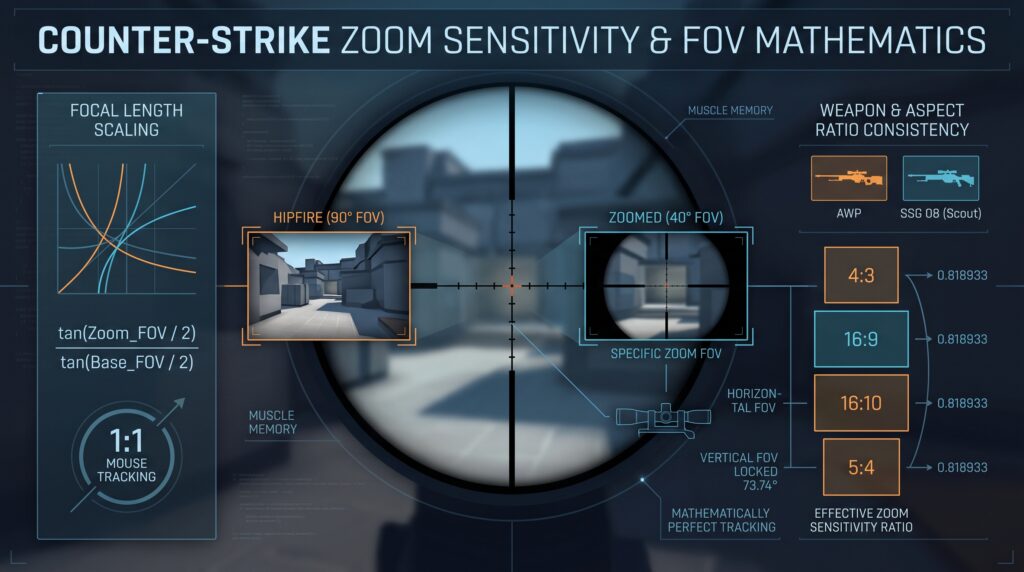
Understanding the exact relationship between Field of View (FOV) and zoom sensitivity is essential for maintaining consistent muscle memory across different zoom levels. To achieve 1:1 tracking—where a specific physical mouse movement covers the same visual screen distance regardless of zoom level—we must rely on focal length scaling rather than the game engine’s default linear […]
Easy Way to Find All Your CS2 Binds Using the Developer Console

Learn how to find all CS2 binds using the developer console. List key binds or check a specific key with simple commands in Counter-Strike 2 fast.
New Tool Release: “CS2 Autoexec Tool” – Quickly Generate Your Autoexec with Custom Settings

Generate your CS2 autoexec easily with our free CS2 Autoexec Tool. Save configs, keep settings consistent & optimize Counter-Strike 2 fast
New Tool Release: “CS2 Volume Converter” – Easily Convert In-Game Volume to Autoexec Format

CS2 Volume Converter – Instantly turn in-game volume % into autoexec values. Built for config lovers. Fast, accurate, no guesswork.
Why Disable “r_show_build_info”? 3 Quick Reasons

Discover the purpose of r_show_build_info in CS2, how to disable it for a cleaner view, and why some advanced users might still want it enabled.
Master CS2 Settings: 3 Ways to Turn On the Developer Console

Learn how to enable the developer console in CS2 with 3 easy methods — via settings, launch options, or autoexec — for full control and custom binds.